


CoverMe - Second Phone Number
3.11.56K Reviews
App Specs
- Version
- 2.8.85
- Updated On
- License
- Free
- Downloads
- 1,000,000+
- Developer
- CoverMe Secure Messenger Inc.
- Categories
- Communication
- Platform
- Android
Screenshots
 Analysis by AppCompare
Have you ever found yourself needing another phone number but don't want to deal with the hassle of getting a new SIM card or a whole new device? Enter CoverMe - Second Phone Number, an app that’s here to save the day. I’ve spent some time playing around with it, and here’s what I think.
Where CoverMe fits in today
CoverMe is a communication app from CoverMe Secure Messenger Inc. I see its main appeal as keeping a separate number and conversations apart from the number people already use to reach you. That can be useful when you post a listing, make a new work contact, or need a dedicated way for clients to call without handing out your everyday number.
The distinction matters: a second number can reduce how widely your primary number circulates, but it does not make every interaction anonymous or guarantee privacy by itself. I’d treat it as a practical layer of separation, not a replacement for careful choices about what I share or who I trust. Anyone relying on it for sensitive work should also check that the app’s current capabilities meet their needs before moving important conversations there.
With a 3.1 average from around 10,000 ratings and more than a million installs, it has attracted a sizeable audience, though the rating suggests experiences are mixed. I’d take that as a reason to test the parts I care about early rather than assume the app will fit every phone, network, or routine equally well.
First Impressions and Setup
Downloading CoverMe was a breeze. Available on both Android and iOS, it’s a quick install. Once you open it, the interface is pretty clean and intuitive. You don’t need to be a tech wizard to navigate this one, which is a big plus in my book.
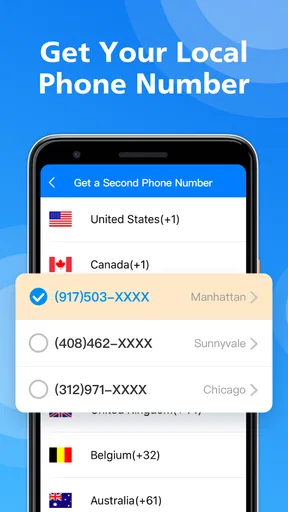
The setup process is straightforward. You just create an account, choose your new number, and you're good to go. What I found super cool is that you can actually pick a number from different locations. So, if you want to feel a little international, why not snag a number from another city or state?
Making a second number useful day to day
I’d use that separation deliberately rather than give the new number to everyone. For example, if I were selling a desk online, I could share the CoverMe number with people arranging a viewing, then keep family and existing contacts on my usual line. Once the sale is done, I can stop using that contact channel without needing to reorganize my personal address book.
Worth Reading Before You Choose

EA SPORTS FC Mobile 26 Is a Bigger Football Game, but It Takes Time

Flipboard Shows What News Apps Must Do Beyond the Feed

Switching to Android Auto Means Rethinking Your Driving Routine

Google Calendar Makes a Crowded Week Easier to Manage

Ludo King Makes the Most of the Minutes Between Plans

Baby Panda World Brings Quick Play to Modern Phones, but Its Game Library Feels Busy
A similar approach works for freelance enquiries: use one number on a portfolio or business card, and keep the main number for friends and family. The trade-off is that people may still expect a prompt reply, so a second line only helps if I remember to check it. I’d make a simple routine—such as checking it at lunch and after work—before relying on it for time-sensitive clients.
Picking a number associated with a different location could also affect how a caller perceives the contact. I would choose a location that makes sense for the people I expect to reach, rather than treating a faraway area code as a shortcut to anonymity. A number that looks unfamiliar may be ignored, and a local-looking number does not prove where its user is.
Features That Stand Out
This app isn't just about having a second phone number. Oh no, it offers a whole suite of features that might make you feel like a secret agent. Here’s a quick rundown of what caught my eye:
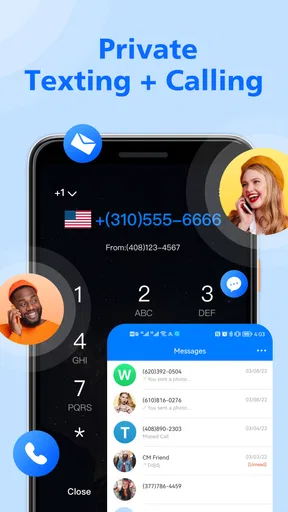
- Private Messaging: It has its own messaging platform, where your texts are encrypted. So, if you're chatting about top-secret plans, you can breathe easy.
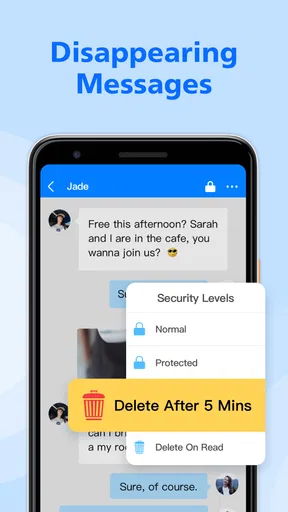
- Disappearing Messages: Taking a leaf out of Snapchat’s book, you can send messages that vanish after being read. Perfect for those "oops, did I really just send that?" moments.
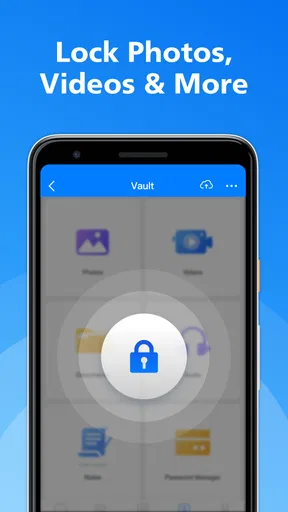
- Vault Storage: Got some pics or files you’d rather keep under wraps? Store them in the app’s encrypted vault. It’s like having a tiny Fort Knox in your pocket.
- Call Forwarding: Don’t miss any important calls by forwarding them to your main number. It's seamless and super handy.
I also noticed that the app provides a secure line for internet calls. The quality was surprisingly good, with very little lag or distortion, which is impressive given my sometimes dodgy Wi-Fi.
Using privacy tools with care
The messaging and vault features make the app more than a number switcher, but I’d still use them with a clear purpose. Disappearing messages can reduce how long a conversation remains visible in the app; they cannot stop someone from saving a screenshot or photographing a screen. I would never use that setting as a promise that a message cannot be kept or shared.
The vault is most useful as a place to keep selected files away from the ordinary photo stream, not as a reason to store the only copy of something important. For anything irreplaceable, I’d keep a separate backup. That small habit avoids turning a privacy feature into a single point of failure if I change phones or lose access to the account.
Call forwarding can be convenient when I want calls to reach the phone I already monitor, but it also changes the boundary I’m trying to create: forwarding a second-line call to my main number means the call ultimately reaches that device. I’d use it when convenience matters more than keeping the lines entirely apart, and leave it off when separation is the priority.
User Experience
Using CoverMe feels smooth. I didn't experience any crashes or bugs, which is always a relief. Navigating through the app is quite intuitive. Everything is where you’d expect it to be, so there’s no need for a manual or endless Googling to figure things out.
One thing that I really liked is the app’s customization options. You can tweak your notification settings, change themes, and even set up auto-replies. It’s all about making the app work for you, and I’m all for that kind of flexibility.
How it compares with ordinary messaging
Compared with using a regular messaging app tied to my everyday number, CoverMe’s strongest difference is the extra contact identity and its separate set of privacy-oriented tools. If I only need to chat with people I already know, my usual messaging app is simpler: everyone is already there, and I don’t have to remember another inbox. If I need a distinct number for a limited purpose, CoverMe is the more relevant option.
It is not automatically a better choice than a dedicated work phone or a separate SIM. A second device gives a clearer physical boundary and can be switched off independently, while a separate SIM may suit someone who wants a conventional mobile line. CoverMe is appealing when I want to manage the extra number from an app, but I’d choose an alternative if my work requires a device that can be fully put away at the end of the day.
Before sharing the number widely, I’d test a complete loop: send a message, receive a reply, place a call, and check whether forwarding and notifications behave the way I expect. That is more useful than assuming the setup is finished once a number appears. It also lets me spot whether the app fits my real routine before I depend on it for a client, appointment, or sale.
What the version history can—and cannot—tell me
CoverMe has been available since July 2013, and its current version is 2.8.85. That long span suggests an established product rather than a brand-new experiment, but the version number alone does not tell me which features changed or how they changed. I would not infer a particular improvement from it without release details.
For someone already using an older version, the practical question is whether the current app continues to work with their phone and whether the features they rely on remain available after updating. The stated minimum OS is 7.0, so compatibility is broad on paper, but I’d still check the app on my own device before making it the sole route for important calls. An update is worth considering when it resolves a problem I actually have; I would avoid changing a dependable setup right before an important event.
Is It Worth the Price?
Now, let’s talk about the elephant in the room: cost. CoverMe offers a free version, but to get the most out of it, you might want to consider the premium options. They offer various plans, so you can pick whatever suits your needs.
I found the pricing to be pretty reasonable compared to what you’d spend on a second phone line. Plus, the added features make it feel like you’re getting more bang for your buck. But, as always, it’s worth weighing up your personal need for a second number against the subscription cost.
Check the commitment before depending on it
The app is free to download, with in-app purchases ranging from $0.99 to $99.99 per item. That wide range makes it sensible to look carefully at what an individual purchase covers before paying. I would first work out whether I need the number itself, extra communication options, or privacy tools, then compare the actual purchase presented in the app with that need.
For a short project or a one-off online sale, I’d be cautious about paying for a longer commitment before I know how often I’ll use the number. Someone who handles client calls every week may value a paid option differently from someone who only wants a temporary boundary. The useful comparison is not simply “app versus phone plan”; it is the cost of the specific service I’ll use against how much separation and convenience it gives me.
The app is rated for Everyone, but that rating is not a substitute for checking whether its features suit the person using it. I would especially help a younger or less experienced user understand that privacy settings cannot control what another person does with a message after receiving it.
Who should choose it—and who should pass
I can see CoverMe working well for someone who wants a practical buffer between public-facing contacts and a personal number, such as a freelancer taking initial enquiries or a person arranging local pickups. It is also worth considering if private messaging and a place for selected files are useful alongside the extra line, rather than needing a number alone.
I’d skip it if I need a guaranteed business communications system, a fully separate work handset, or a service whose terms and privacy protections I have already vetted for particularly sensitive information. I’d also pass if I know I won’t check another inbox consistently. In those cases, a conventional second line, a work-managed phone, or the messaging tool my contacts already use may be less fiddly and more dependable for that specific job.
Final Thoughts
Overall, CoverMe - Second Phone Number does what it says on the tin and then some. It’s a nifty little app that packs a punch with its features. Whether you’re looking to keep your personal and work lives separate, or just want to enjoy the novelty of having multiple numbers, this app has got you covered.
It’s perfect for freelancers, entrepreneurs, or anyone who values a bit of privacy. So, if you’re in the market for a second number, I’d definitely recommend giving CoverMe a whirl. It might just become your new favorite tool.
My bottom line
I’d start with a low-stakes use rather than immediately moving every business contact or private conversation over. Try the number for a small project, learn how calls and messages arrive, and then decide whether the extra separation is worth keeping. That approach also gives me a chance to judge whether notifications and checking a second inbox fit naturally into my day.
CoverMe is most convincing when I want one app to handle a separate number and a few privacy-minded communication tools. It is less compelling if I only need ordinary messaging or require a hard boundary between work and personal life. I’d recommend trying it with realistic expectations: useful separation, not invisibility, and a convenient option rather than a universal replacement for a second phone line.
Pros
- Easy to set up and use for new users.
- Offers private messaging with encryption.
- Multiple numbers available for different needs.
- Affordable pricing for premium features.
- No ads in the premium version.
Cons
- Limited free features compared to competitors.
- Occasional glitches in call quality.
- Requires internet for optimal functionality.
- Some features need additional payment.
- Not available in all countries.
FAQs for CoverMe - Second Phone Number
What is CoverMe - Second Phone Number and how does it work?
CoverMe is an app that provides a secondary phone number for your device, allowing you to make calls and send texts without revealing your personal number. It works by assigning a virtual number that you can use for privacy or business purposes. This ensures your main contact stays private while communicating through the app.
Is my personal information secure when using CoverMe?
Yes, CoverMe prioritizes user privacy and security. It uses encryption to protect your calls and messages, ensuring that your personal information remains confidential. The app also offers features like self-destructing messages and a private vault to secure your data further. Your real number is never disclosed through the app.
Can I use CoverMe for international calls and texts?
Yes, CoverMe supports international calls and texts, making it a convenient option for those needing to communicate globally. The app provides competitive rates for international communication, allowing you to connect with contacts worldwide without incurring high charges from your regular provider.
How many additional numbers can I have with CoverMe?
CoverMe allows you to have multiple virtual numbers, each serving different purposes such as business, dating, or personal privacy. You can manage these numbers easily within the app, switching between them as needed. This flexibility helps users keep different parts of their lives separate and organized.
What are the costs associated with using CoverMe?
CoverMe offers various pricing plans, including free and premium options. The free version provides basic functionalities, while premium plans unlock additional features like multiple numbers and extended privacy options. Users can choose a plan that suits their needs, with subscriptions typically billed monthly or annually.


